A step-by-step guide.
If you’ve ever fumbled for your garage remote in the dark, or realized it’s buried somewhere in your center console, you’ve probably wondered: Why don’t I just sync my garage door opener to my car?
The good news? In most cases, you can (and should), you just haven’t yet.
If you’re searching for how to sync garage door opener to car, this guide will walk you through it in simple, real-world terms, no tech degree required.
First: Does Your Car Support It?
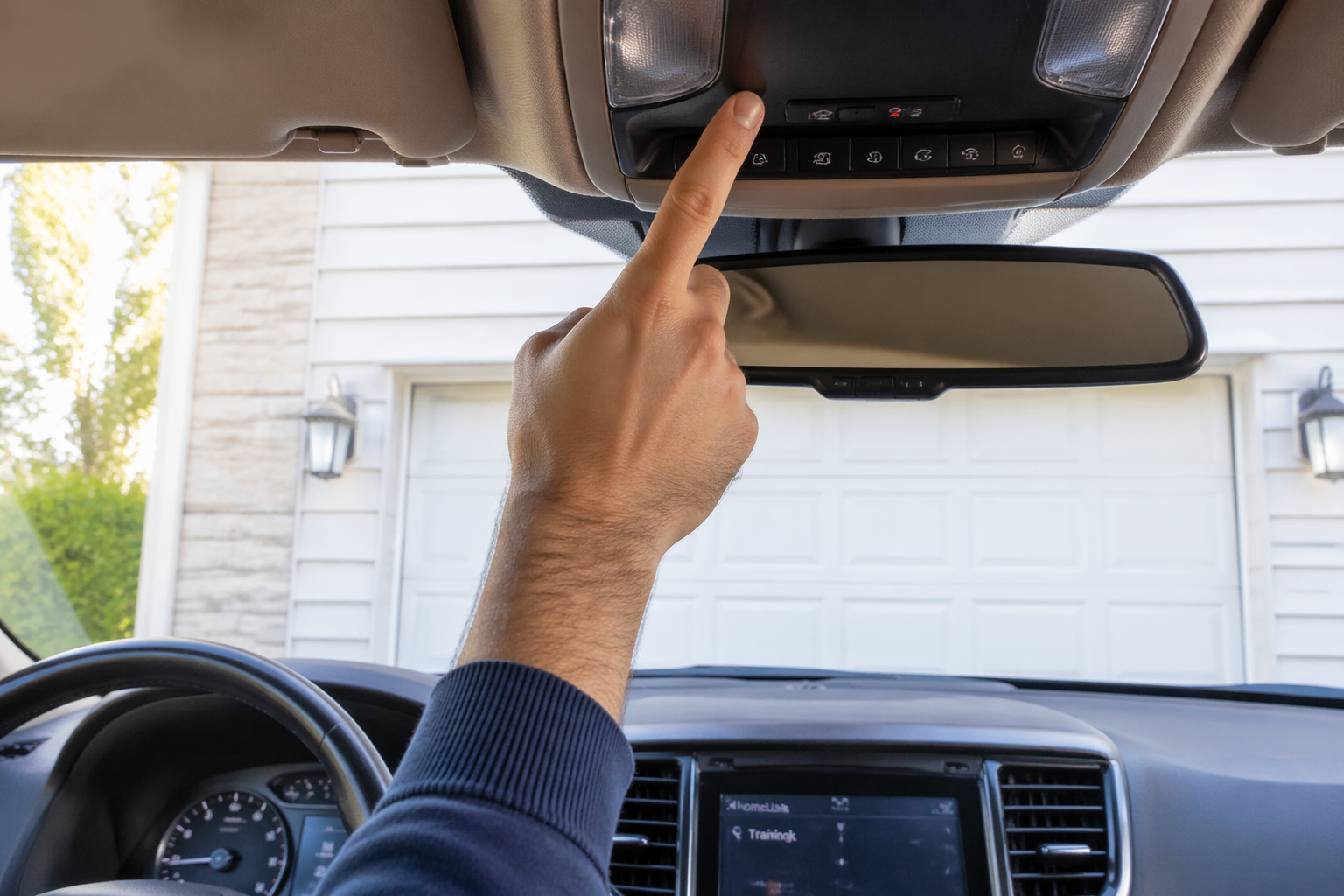
Most vehicles made in the last 10–15 years come with built-in HomeLink or Car2U systems. These are usually located:
If you see three small house-shaped buttons, you’re likely good to go.
If not, you may need a universal remote or an upgraded mirror system (or a new car).
Step 1: Clear Old Programming (Important)
Before you sync anything, clear out previous codes.
- Turn your vehicle on (engine doesn’t need to be running).
- Hold down the two outer buttons on your in-car garage controls.
- Keep holding until the indicator light begins flashing rapidly.
Now you’re starting fresh.
Step 2: Grab Your Garage Remote
To complete the process of how to sync garage door to car, you’ll need your existing handheld garage remote.
- Hold the remote close to your car’s built-in buttons.
- Press and hold the button on your remote.
- At the same time, press and hold the button inside your car that you want to program.
- Wait until the indicator light changes (usually from slow blink to rapid blink).
This means the car has learned the signal.
Step 3: Sync With the Garage Door Motor
Here’s where many homeowners get stuck.
Modern openers use “rolling code” technology for security. That means after pairing your car, you still need to link it to the motor unit.
- Go to your garage door opener motor (mounted on the ceiling).
- Find the “Learn” button (often yellow, red, orange, or purple).
- Press it once, you usually have 30 seconds.
- Return to your car and press the programmed button for a few seconds.
Your garage door should move. If it does, you’re synced.
If you’re still wondering how to pair car with garage door opener, 9 times out of 10 it’s because this “Learn” step was missed.
Common Syncing Problems
If your garage door doesn’t respond:
- The remote battery may be weak.
- The system may need to be reset and reprogrammed.
- There could be interference from LED bulbs or nearby electronics
And sometimes, the issue isn’t syncing, it’s the opener itself.
If your garage door has been acting up (slow response, partial opening, random reversing), it may need service before programming will work properly.
When to Call for Help
If you’ve tried everything and your car still won’t connect, it could be:
Garage door systems are simple once they’re working, frustrating when they’re not.
If you’re tired of troubleshooting and just want it done right, professional service can sync your system quickly and check that your opener is functioning safely and efficiently.
Because honestly, once it’s paired, you’ll wonder why you didn’t do it sooner. At Allied Doors South Florida, we can quickly sync your system, diagnose any underlying problems, and make sure everything is working safely and reliably. Contact us today!